
If you’re still treating your accounting system like a physical ledger book that just happens to live in the cloud, you’re overlooking most of its value. We have implemented Xero for hundreds of clients, but in my experience the majority of business owners are not using it to its full potential.
This blog will show you the hidden gems within Xero (other accounting systems may have similar capabilities) that will turn ordinary accounting into an extraordinary asset for your business. You can think of Xero as simply a place to send invoices from, or you can view it as a repository of vitally useful information with the potential to significantly enhance the financial health of your business.
Just a few minutes learning to customise a report or adding some extra bank rules can have a profound impact, especially when you can see that something is going wrong and fix it before there is lasting damage. Develop the positive habit of thinking more proactively about your business by making sure your accounting system has complete, real-time records! Here are 10 ways I encourage business owners to do this.
My top real-time accounting secrets for a thriving business
1. Bring payroll information into your accounting system
Lots of businesses have a payroll system that isn’t cloud-based and therefore doesn’t integrate with their accounting system. They process their pay run in the payroll system but won’t necessarily go and create the manual journal in Xero to reflect this. I feel this is something you must do at the same time. For many businesses, paying staff is the biggest expense they have. If someone gets paid, you should see the cost in Xero immediately. If it takes weeks for the accounting system to be updated (when you do your management accounts, for example) this means your profit and loss (P&L) report in Xero won’t reflect the cost of your payroll and is essentially worthless.
I recommend moving to a cloud-based payroll system that integrates seamlessly with Xero if at all possible. The two systems we use most are Parolla and SimplePay. There are other systems that handle Irish payroll, but most of them are still not cloud-based and the ones that are don’t integrate fully with Xero and will require you to create a manual journal for each pay run. But even if that is the case, I still recommend you do your journal at the same time as you run payroll. It takes a few minutes and keeps your information in Xero up to date.
2. Use the live bank feeds feature in Xero
Xero has lots of automations, and the live bank feeds feature is one of the most useful ones for business owners. Anything that isn’t on credit (by which I mean spending such as direct debits or card payments) should be on a bank feed and have bank rules set up (see below). Too many businesses don’t have bank feeds set up, which means they have no visibility over their spending until they manually upload a spreadsheet of their bank transactions and reconcile them.
When you connect your bank accounts to Xero, bank transactions flow directly into Xero within one or two days of completion. You can connect BOI and AIB bank accounts, but also payment platforms such as GoCardless (which we recommend as a solution for ongoing customers to pay invoices via direct debit) and online banks such as Revolut Business.
3. Set up bank rules for all repeating transactions
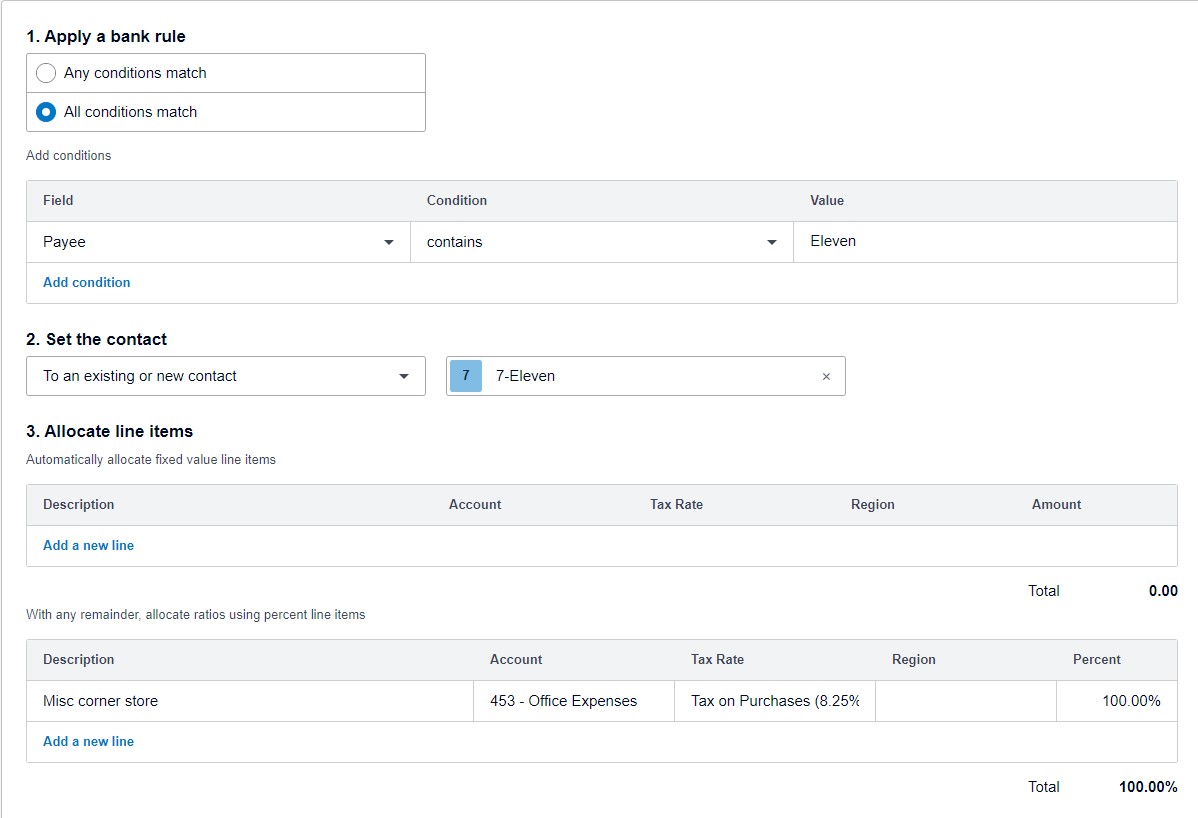
Bank rules in Xero allow you to streamline transaction categorisation. By setting up rules, you can automatically populate the information on repeating transactions (for example, the description, account, and VAT rate to apply). This minimises manual entry and reduces errors, but also means that reconciliations are just a once-click task. Start using bank rules by identifying your common recurring transactions and establish rules for how these should be recorded in Xero. It’s a small effort upfront that pays dividends in time saved down the line.

4. Use Xero’s automated invoicing features
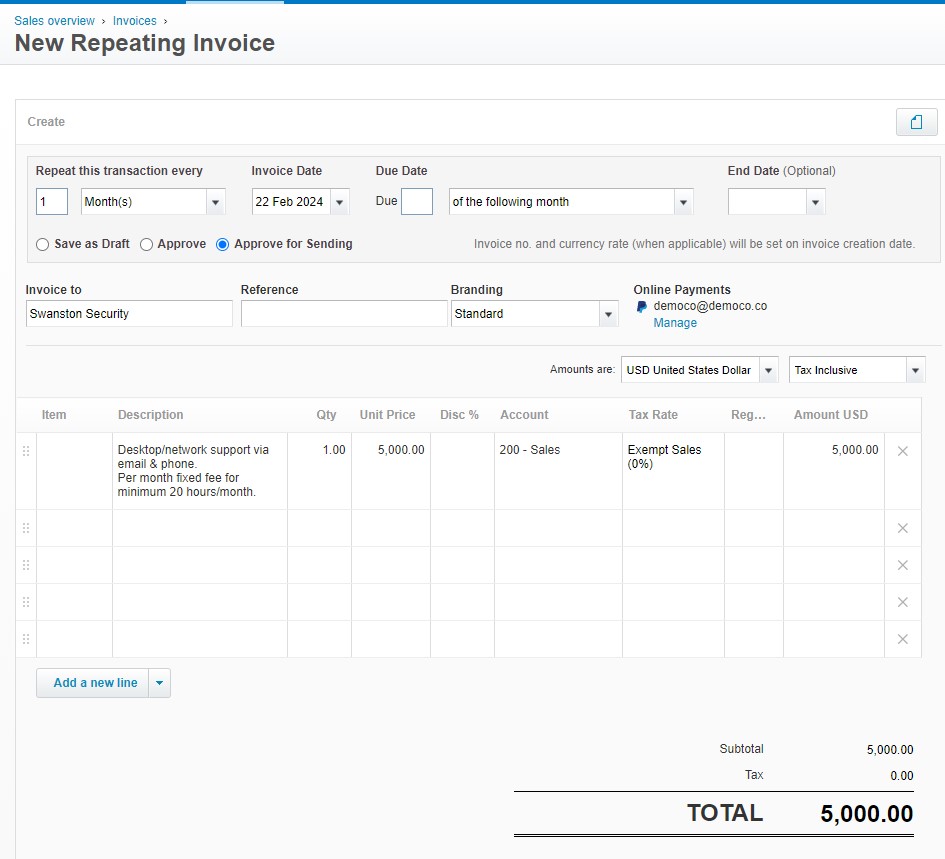
Where you invoice clients more than once (monthly, quarterly, annually, etc.), set this up as a repeating invoice. If there are potential variations in your invoices, you can have Xero save the new invoice as a draft rather than an approved invoice, which will give you the opportunity to tweak any details before the invoice is sent to the client.
If your invoicing is always the same, simply set it to automatically approve and send so you don’t have to do anything. This not only speeds up the process but also ensures invoices are sent on time even if you are busy, improving your cash flow. To minimise overdue invoices, set up automatic reminders to nudge clients who are late payers. Alternatively, for an extra smooth process, have all your clients sign up for direct debit with a service such as GoCardless so you never have to worry about credit control at all.
5. Record spending on the go with an expenses app
If anyone in the business uses their own money to purchase things for the business, ensure they are using an expenses app. We have written about Xero Expenses before; rather than keeping paper receipts and having a big pile to process at the end of the month, all expenses should be recorded as they happen (photographed with the phone camera) and automatically synced with Xero.
More and more businesses are issuing company cards to employees (this is really easy with Revolut Business, for example) so that the business can pay for expenses directly, but you still need to bring the receipt into the accounting system so that the bank transaction can be swiftly and accurately reconciled. There are lots of expenses apps out there to help you make the whole process instant and paperless. Now you have a real-time view of expenses (whether paid for by the business or an employee/director) to help you stay on top of budgets and financial planning.
6. Learn to use the fixed assets register
Assets are whatever your business owns that are held for long-term use and are not likely to be converted quickly into cash. These assets usually have a useful life of more than one year and are used in the operations of your business – we could be talking about anything from property to office furnishings to computers. The Fixed Assets Register in Xero is a robust tool for tracking the value of your assets over time.
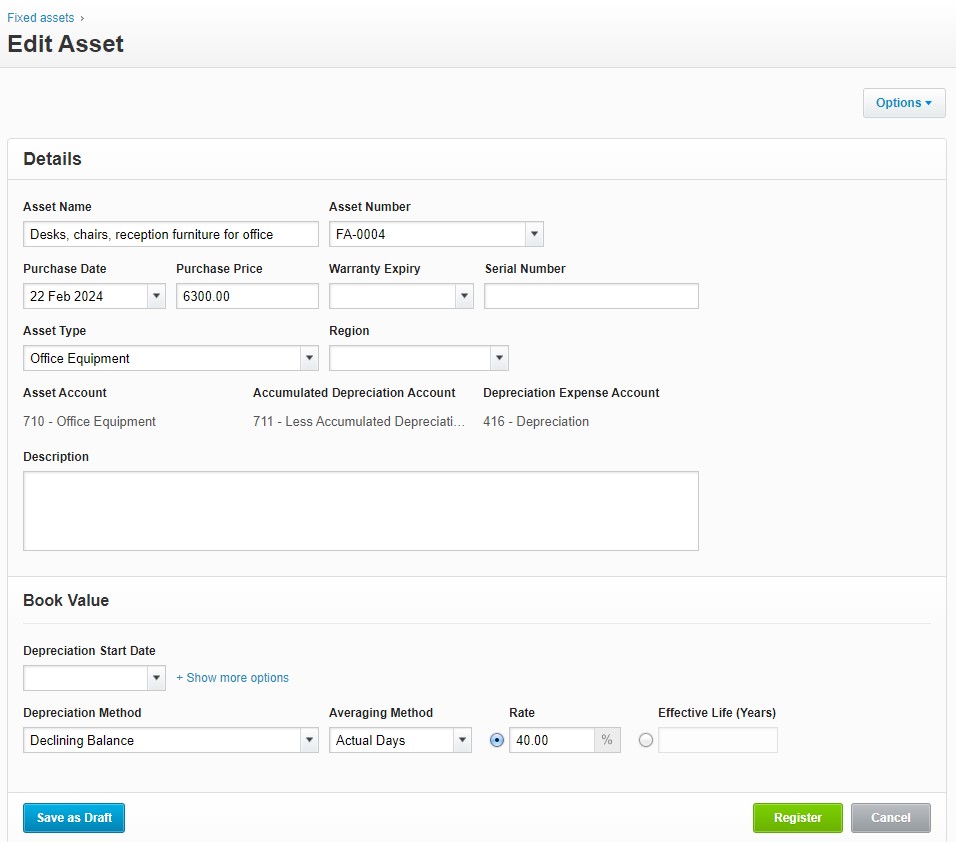
For assets that depreciate in value, you can use the register to automatically calculate and post depreciation on your company’s assets, rather than doing it manually once a year. Ensure all business assets are recorded in this register and set up depreciation calculations to give a true picture of asset value and business worth in real time. Regularly review and update the register to reflect any new purchases or disposals.
7. Email your purchase bills to Xero
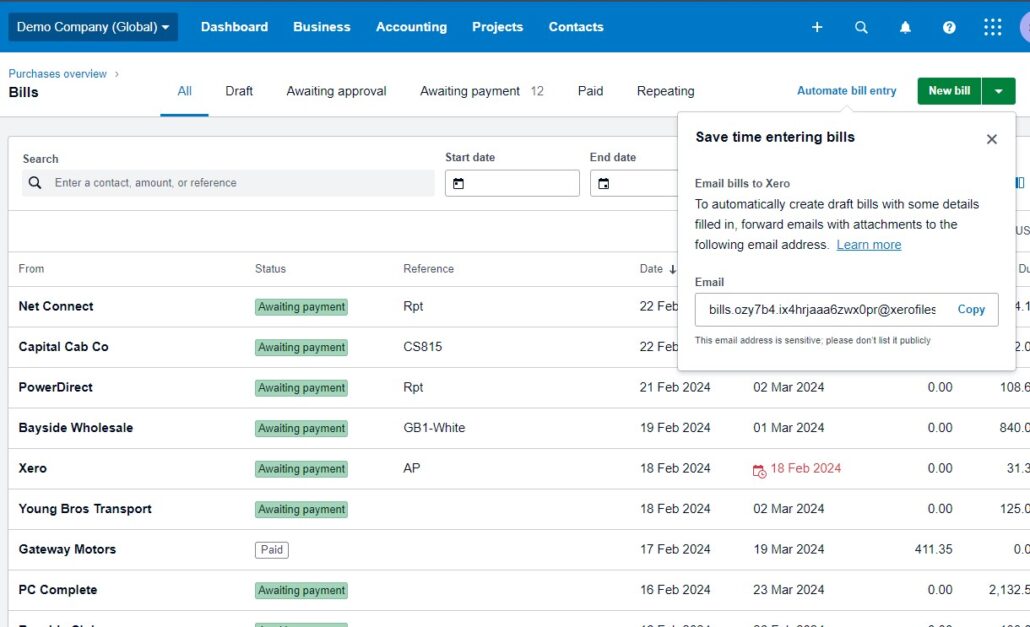
Xero has a feature for the direct emailing of purchase bills into the system, streamlining the process of updating your accounts payable and making reconciliations even quicker. Every business in Xero has a unique email address for bills to be sent to (it looks something like bills.oqq8-w.fumfqatzjo94hld@xerofiles.com). When your suppliers send your bills as PDF attachments, simply forward those to this email address. Xero will automatically create draft bills, extracting key information from the PDF so that you can simply find and select the matching transaction when reconciling your bank accounts. Monitor your accounts inbox and forward all digital copies of invoices immediately for a real-time view of your liabilities.
8. Add your bank statements to Xero Files
Automatic bank feeds are a game changer, but you do need to check your Xero bank transactions against your bank statements to ensure there is nothing missing. This vital part of checking the accuracy of your accounting often isn’t done until after the financial year end, when your accountant starts working on your Financial Statements. If you are going to rely on the information in your accounting software and use it in real time to make key business decisions, I think this kind of thing should really be done at the end of the month – as soon as your bank makes your statements available. We now encourage our clients to upload their statements to Xero Files every month so these checks can be done in a timely manner. This practice not only saves time but also ensures that financial reports are always current and reliable.
9. Create a monthly budget for internal planning
Xero’s Budget Planner is a great tool for creating a simple internal budget that supports your yearly business planning. It’s easy to use. Put in a monthly budget for each account category (cleaning, entertainment, insurance, etc., depending on how your accounts are set up) and then auto-populate the rest of the year by either duplicating the amount each month, augmenting it every month, or changing it by a certain percentage.
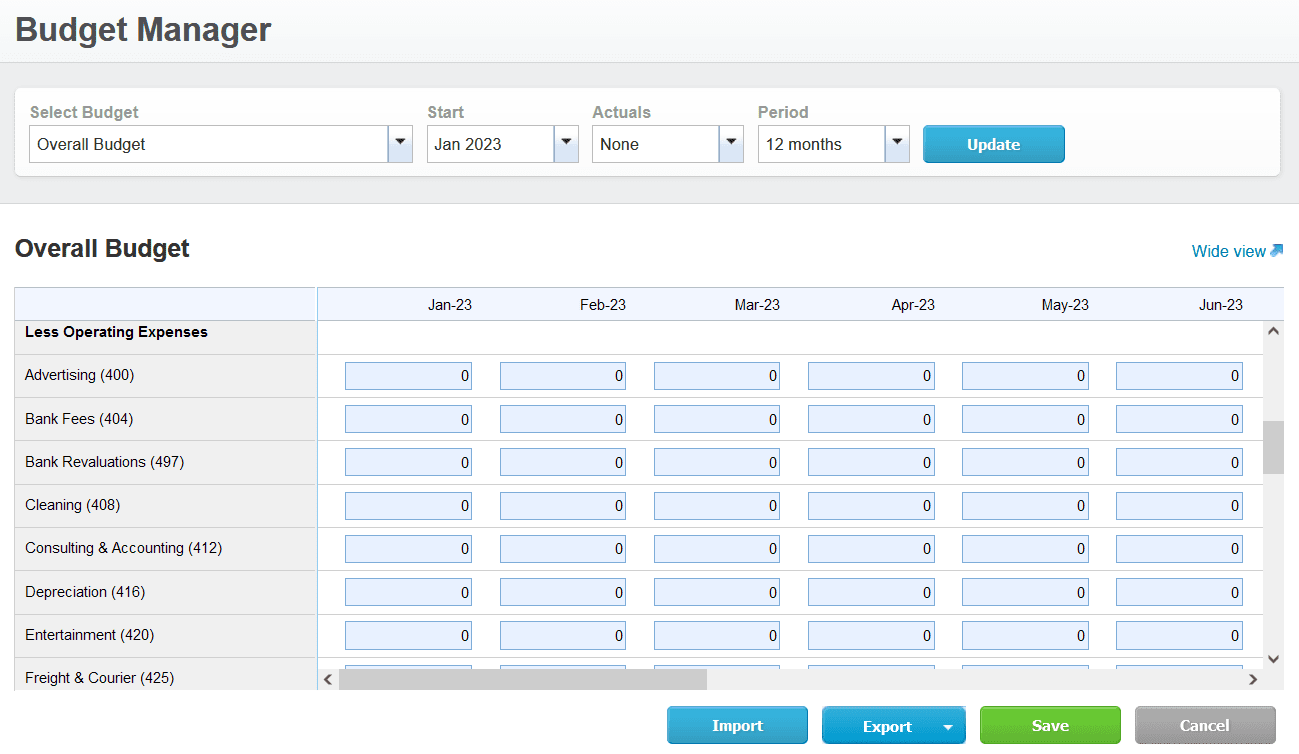
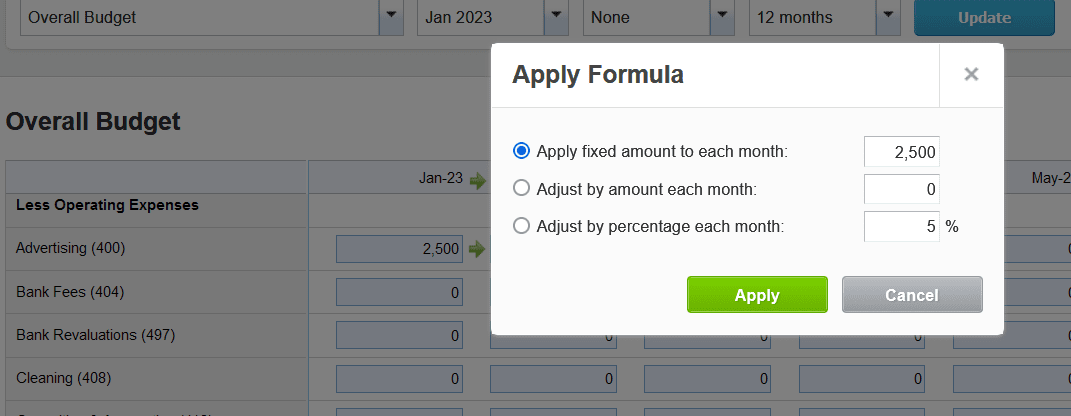
Typically, you only need to create a budget once a year. Then spend a little time every month and/or quarter to review your performance against the budget (which you do in your Budget Variance report) and make changes that can be the difference between success and failure. This strategic way of managing your business is a world away from relying on that day’s bank balance to give you a (usually misguided) idea of your financial health. Check out our blog to understand why and how to create a budget for your business.
10. Hold regular financial management meetings
Being proactive about your financial managements means not delaying tasks. A good way to ensure this is regular meetings with your bookkeeper and with your accountant.
Schedule a weekly bookkeeping check-in with your bookkeeper. It will take at most half an hour and keeps you and your bookkeeper accountable. It also gives the bookkeeper a chance to ask questions or check on specific details so that nothing falls between the cracks. They can then clear off any outstanding items and ensure your books are always up to date.
Schedule a monthly management accounting meeting just after the bookkeeping is closed (around the 5th to 10th of each month). This allows you to review the previous month’s accounts with your accountant or management accountant, analyse your results, and discuss any issues. Holding this kind of financial check-up within days of the cycle makes the data really meaningful. In my experience, it creates a bit of excitement to do this when the metrics are fresh, and you still have the chance to affect the outcome of the new cycle you’re now in.
Financial mastery is easier than you think!
All the tactics above are easy to do and quick to implement. Once you have a process that results in live financial reporting, you’ll wonder how you ever lived without it. Adopt real-time practices by fully exploiting Xero’s capabilities to maintain an up-to-date view of your financial position and enjoy more informed decision-making and a healthier business.
If you aren’t using Xero beyond its basic features, it may be time to invest in some training so you understand just what it’s capable of. We regularly train individuals and teams to use Xero more effectively – even two or three hours a year to upskill will have a big impact on how you use it.
If sound financial management is a priority for your business, you might benefit from an outsourced accounting package from Beyond. We look after the day-to-day, but also have an eye on your longer-term strategy and growth plans. Get in contact with us today to see how we could help.
Rory
P.S. If you find our articles informative, you can add us to your preferred Google search sources.